Best Learning Robots for Kids to Spark Creativity and Coding
Educational robots blend play with learning, helping kids build foundational skills in science, technology, engineering, and math. This guide highlights five top picks that combine remote control, programming, and interactive features to keep children engaged while developing problem-solving abilities. Each selection emphasizes safe materials, age-appropriate activities, and opportunities for hands-on experimentation.
| Product | Brand | Primary Skill Focus | Age Range |
|---|---|---|---|
| KingsDragon RC Robot Toys | KingsDragon | Gesture Control, Programming | 3-8 |
| Ruko 1088 Smart Robot | Ruko | Voice & App Control, Coding | 4-9 |
| Miko 3 | Miko My Companion | STEAM Content, Personalization | 5-12 |
| Makeblock mBot Kit | Makeblock | Scratch & Arduino Coding | 8-12 |
| Learning Resources Botley | Learning Resources | Screen-free Coding | 5+ |
KingsDragon RC Robot Toys For Kids

The KingsDragon gesture-sensing robot offers a combination of infrared remote control and gesture-based commands. Users can issue left, right, forward, and backward movements through hand signals, expanding play beyond a traditional controller. Its programming mode supports recording and replaying a sequence of up to 50 actions, including patrols, dances, and other complex routines. The robot features blue LED eyes that illuminate during motion, enhancing visual feedback for kids during play. Built from non-toxic ABS plastic, it includes flexible joints and sturdy wheels for diverse movement patterns. The product emphasizes safe materials, durable construction, and multi-function play that blends physical and cognitive tasks.
Ruko 1088 Smart Robots For Kids

The Ruko 1088 stands out as a large, interactive educational robot with voice and app control. It offers ten expressive moods, nine flexible joints, and a repertoire of ten songs to boost dynamic play. This robot serves as a gateway to basic programming concepts while encouraging kids to build logic, creativity, and coordination through hands-on demonstrations, storytelling, and dance activities. Its versatility makes it suitable for curious learners who benefit from varied modes of interaction and a tangible introduction to STEM topics.
Miko 3: AI-Powered Smart Robot (Blue)
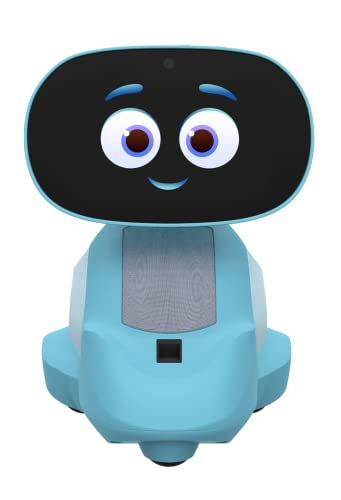
Miko 3 is an AI-driven educational companion designed to support STEAM learning through interactive apps and games. The robot features a conversational, human-like interface and an evolving knowledge base that adapts to a child’s interests. Its learning-forward approach includes personalized interactions, hands-on activities, and a touchscreen for immersive experiences. Reports suggest strong engagement benefits as children explore storytelling, music, yoga routines, and age-appropriate challenges. The Red variant offers a similar feature set with a distinct visual style for variety in kids’ tech toys.
Makeblock mBot Robot Kit

Makeblock’s mBot Kit is positioned as a beginner-friendly entry into robotics, electronics, and programming. It supports Scratch and Arduino, enabling kids to progress from simple coding to more advanced projects. The kit includes clear building instructions and a remote control feature for hands-on learning, including line-following and obstacle-avoidance modes. It’s complemented by a library of tutorials and apps that extend learning beyond assembly, encouraging iterative experimentation and project-based play.
Learning Resources Botley The Coding Robot

Botley the Coding Robot offers a screen-free approach to early coding skills. Aimed at ages five and up, Botley includes 80-step programs with loops and obstacle features to scale the challenge. It arrives ready-to-use with a remote, requiring minimal setup and batteries. The hands-on, kid-friendly design supports independent exploration and collaborative learning, making it a solid option for households prioritizing traditional, non-screen-based STEM activities.
Buying Guide
When choosing a learning robot for kids, consider the following dimensions to match a child’s age, interests, and learning goals:
- Age appropriateness and safety: Look for non-toxic materials, rounded edges, and compliance with toy safety standards. Some devices are designed for younger kids (3–5), while others target older children (8–12) with more complex programming.
- Learning style alignment: For screen-free exploration, Botley-like toys emphasize unplugged coding. For interactive storytelling and AI-driven content, Miko 3 or Ruko models offer more dynamic engagement.
- Programming pathway: Some robots support block-based coding (Scratch-style) and transition to text-based programming later. Define whether a child will grow from guided play to open-ended projects.
- Interaction modes: Remote control, gesture sensing, voice commands, and app integration each provide different onboarding experiences. A mix of tactile and digital interfaces tends to sustain interest.
- Durability and maintenance: Consider battery life, charging time, and the ability to survive typical kid-friendly handling. Sturdy builds reduce frustration during experiments.
- Educational value vs. entertainment: Stronger STEM focus (Makeblock mBot, Botley) emphasizes problem-solving and sequencing, while others (Miko 3, Ruko 1088) blend social interaction with learning.
- Expansion possibilities: Kits with add-on modules or companion apps enable ongoing learning, which can be valuable as a child’s skills advance.
In selecting among these options, balance the child’s curiosity with the family’s preferred learning pace. For a screen-free starter, Botley or gesture-based models can build foundational logic. For deeper coding experiences, the Makeblock mBot or Ruko 1088 provides a scalable path through Scratch, Arduino, or app-based environments. If parents seek a social, AI-powered partner, Miko 3 offers personalized interactions and rich STEAM content. Each choice supports cognitive development while keeping play engaging and age-appropriate.