Best Recordable Buttons for Special Needs
Finding accessible communication devices can support classroom activities, home routines, and social interactions. The following five recordable buttons are selected for reliable playback, clear audio, and easy use for varied abilities. Each item offers simple recording, holds up to a set message length, and is suitable for encouragement, instruction, or social prompts. The table below provides quick references to each option.
| Product | Brand | Recording Time | Notes |
|---|---|---|---|
| CUSTOM EASY BUTTON® – Essential | Custom Easy Button | 30 seconds | Economy model; batteries included |
| Talking Tile Voice Recordable Button | Talking Products | 80 seconds | Removable cover; large, robust design |
| EZSound Multiplay Push Button | EZSound | Multiple recordings (variable) | Great for layered audio projects |
| Honoson 8 Pieces Recordable Buzzers | Honoson | 30 seconds each | 8 colors; classroom-friendly |
| PELTEFLU 4 Pack Voice Recording Button | PELTEFLU | 30 seconds | 4 color options; versatile use |
Custom Easy Button® Essential

The Custom Easy Button Essential records a user’s own 30-second message. It is marketed as an economy model from the original makers of Custom Easy Buttons, with free batteries included. Users can record and change messages easily, making it suitable for quick prompts, reminders, or routines in both classroom and home settings. The button’s straightforward operation helps individuals with motor or cognitive challenges participate in activities that involve spoken input.
Talking Tile Voice Recordable Button

This device allows recording and playback of up to 80 seconds of voice, music, or sound effects. It supports multiple re-recordings and uses a large, robust housing that is accessible for children with visual or motor impairments. A removable clear cover lets caregivers or educators place pictures or symbols to align with the recording, helping users link prompts to visuals for enhanced comprehension and engagement.
EZSound Multiplay Push Button

The EZSound Multiplay Button is a recordable sound module designed to support multiple recordings and audio playback. It is compatible with various creative projects, including model displays, greeting cards, and personalized sound effects. The product emphasizes simple USB-based recording workflows and high-quality audio playback, enabling educators or families to craft engaging audio prompts or messages for diverse needs.
Honoson 8 Pieces Recordable Buzzers

Honoson offers a pack of eight color-coded recordable buzzers, each capable of storing up to 30 seconds of sound. The set is described as durable with ABS construction and battery-operated. It is positioned as a practical teaching tool for group activities, providing a loud, clear sound that can capture attention and support participation among students with varying abilities.
PELTEFLU Voice Recording Button (4 Pack)

The PELTEFLU set includes four color options, each supporting up to 30 seconds of recorded playback. The product highlights ease of use with a simple recording process and clear playback. It is designed for family games, communication training, and interactive activities, including pet training or classroom sessions, offering a compact and portable option for diverse environments.
OFVENS Four Pack Voice Recording Buttons
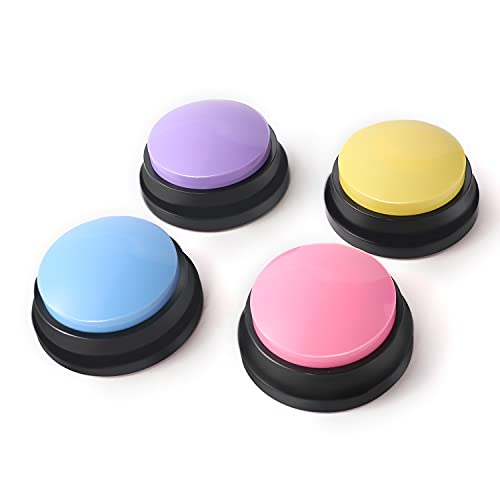
Note: The OFVENS set is presented as four-pack with 30-second recording capacity per button. Users can record and playback messages for reminders, prompts, or fun interactions. The compact form factor supports portable use in homes and classrooms, enabling repeated use for ongoing communication practice or playful activities.
Buying Guide: Key Purchase Considerations
- Recording capacity: Choose a button with enough recording time for intended uses, such as 30 seconds for prompts or 80 seconds for longer messages.
- Durability and accessibility: Look for robust housings, large buttons, and clear audio to accommodate users with visual or motor impairments.
- Ease of use: Favor devices with simple recording steps, quick playback, and clear battery indicators to minimize frustration during use.
- Interchangeable visuals: If visuals help communication, select models with removable covers or the ability to add symbols or pictures.
- Multi-pack options: For classrooms or households with multiple users, consider sets that include multiple colors or units to reduce sharing conflicts.
- Power and batteries: Check whether batteries are included or need replacement; consider rechargeable options if available.
- Portability: Compact buttons are useful for travel or on-the-go activities, while larger units may be easier for first-time users to operate.
- Maintenance and replacements: Assess ease of cleaning and whether replacement parts (batteries or shells) are readily available.