Best Programmable Robots for Schools: Top Classroom Picks
In modern classrooms, programmable robots offer hands-on opportunities for students to develop coding, problem-solving, and collaboration skills. The following selections focus on classroom-friendly, age-appropriate options that support STEM learning, creative thinking, and project-based activities. Below is a quick overview table of five well-suited options for schools, highlighting brand and model details to help educators compare features at a glance.
| Brand | Product | Key Benefit |
|---|---|---|
| Ruko | Ruko 1088 Smart Robots for Kids | Voice, app, and expressive robotics for young learners |
| Holyton | Holyton 5088 Smart Robots for Kids | Large size with multiple control modes for collaboration |
| Wonder Workshop | Dash Robot | Coding concepts through interactive, voice-enabled play |
| Makeblock | mBot Robot Kit | Scratch/Arduino-based learning with multiple projects |
| EduCuties | EduCuties Robot Toys | Gesture and remote control with programmable actions |
Ruko 1088 Smart Robots for Kids

Ruko’s 1088 model stands about 15.8 inches tall, designed to captivate younger learners with engaging play that supports foundational programming concepts. Its multiple expression modes and 10 songs help illustrate how software can control physical movement. The robot’s 9 flexible joints enable a variety of poses, making it suitable for classroom demonstrations and individual exploration. Its blend of voice control, app-based operation, and storytelling or music modes fosters creativity while reinforcing logical thinking and sequencing skills. This unit serves as a tangible introduction to robotics in early STEM curricula and group activities.
Features highlight: tall stature for a dramatic classroom presence, 10 expressive capabilities, 9 joints enabling dynamic movement, and a mix of gymnastic, storytelling, and recording options. The device functions as both a learning aid and a friendly interactive partner to encourage kids to describe, plan, and refine robots’ actions through simple programming concepts.
Holyton 5088 Smart Robots for Kids

The Holyton 5088 is a large, interactive STEM robot with 10 emojis and 200+ programmable actions. It supports three smart control modes, including voice commands, which makes it a versatile classroom tool for introducing coding fundamentals, sequencing, and interactive dialogue. The hardware emphasizes expressive engagement, combining motion with audio responses to strengthen young learners’ comprehension of cause-and-effect in programming. Educators can use it to demonstrate feedback loops, basic automation, and hands-on demonstrations of how software translates into real-world actions.
Key features include a height and presence suitable for group demos, multiple interactive modes, and voice-driven learning that motivates students to test ideas, iterate on instructions, and observe outcomes. The embedded action repertoire supports short lessons in logic, creativity, and collaborative storytelling with robotic partners.
Wonder Workshop Dash Robot

Dash is a compact, voice-activated STEM robot designed for learning coding concepts from beginner to intermediate levels. It ships ready to use with no assembly required and supports appealing activities such as sequencing, loops, and problem-solving challenges. The supported apps (Blockly, Wonder, Path) work across iOS, Android, and Fire OS, making it suitable for classroom tablets and BYOD settings. Dash emphasizes hands-on coding through play, with clear feedback as students experiment with commands, patterns, and logic to guide Dash through obstacles and tasks.
The device is positioned as a classroom-friendly solution for introducing computational thinking, including practical exercises in sequencing, conditional logic, and event-driven programming. Dash also supports group activities, allowing students to collaborate on projects that combine storytelling, design, and basic robotics.
Makeblock mBot Robot Kit

The mBot kit offers a Scratch-style coding experience with Arduino compatibility, making it a versatile choice for middle to upper elementary students. Four included projects—line-following, obstacle avoidance, remote control, and more—provide a structured path from block-based coding to more complex concepts as students progress. The hardware is designed for quick assembly, enabling teachers to deploy multiple setups efficiently in a classroom. Makeblock’s ecosystem supports expanding projects with additional sensors and extensions, enabling deeper explorations into robotics, math, and engineering principles.
With user-friendly manuals, visual instructions, and tips for troubleshooting, the mBot supports classroom scalability, peer-to-peer learning, and project-based assessments that track student growth in computational thinking and problem-solving skills.
EduCuties Robot Toys
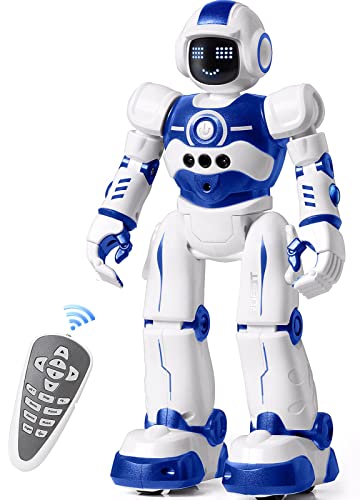
EduCuties combines gesture sensing with remote control and programmable actions, offering a versatile option for age groups ranging from early elementary to middle school. The gesture control adds an intuitive entry point for younger students, while the 50-action memory and programmable routines provide a clear path toward more advanced coding concepts. The design emphasizes robust construction and safe materials, supporting classroom durability and ease of maintenance. Educators can use this robot to demonstrate spatial awareness, sequencing, and repetition through engaging, tangible activities.
Key considerations include gesture responsiveness, ease of programming, and the balance between remote and gesture control modes. The robot’s ability to record and playback complex movements enables students to experiment with choreography, obstacle courses, and interactive storytelling in a group setting.
Buying Guide: Key Purchase Considerations for School Programs
- Curriculum alignment: Look for kits that explicitly support coding concepts (blocks, text-based, or both), with age-appropriate project guides and lesson plans.
- Programming environment: Prefer platforms with visual programming first, transitioning to more advanced languages (Scratch/Blockly then Python or Arduino) as students progress.
- Durability and classroom suitability: Choose robots with sturdy construction, clear safety features, and long battery life to withstand daily use in a busy classroom.
- Control methods: Ensure a mix of remote, app, gesture, and voice controls to support diverse learning styles and reduce bottlenecks during class.
- Scalability: Consider future expansion with additional sensors, extensions, and compatible accessories to grow with the program.
- Assessment and reporting: Favor options that provide progress tracking, rubrics, or printable activities to document student outcomes.
- Cost of ownership: Account for replacement parts, consumables, and software licenses, factoring total cost of ownership over several years.
- Safety and maintenance: Check for non-toxic materials, easy cleaning, and widely available customer support or tutorials for teachers.