Best Coding Robots for Kids to Learn STEM at Home
discovering hands-on coding with robots helps kids develop problem solving, logical thinking, and creativity. This guide highlights five beginner-friendly options that balance screen-free learning and interactive programming, suitable for ages from 4 to 12+. Each product keeps complexity rising with your child’s growing skills, from simple button-press routines to advanced block-based and text-based coding. Explore features, from obstacle detection to voice control, and choose a robot that fits your child’s interests and attention span.
| Product | Brand |
|---|---|
| Botley The Coding Robot | Learning Resources |
| Makeblock mBot | Makeblock |
| Teach Tech Mech 5 | Snap Circuits |
| Sphero Bolt+ | Sphero |
| Wonder Workshop Dash | Wonder Workshop |
Botley The Coding Robot – Screen-Free Coding Kit

Botley offers screen-free coding that introduces fundamental programming concepts without tablets or smartphones. It grows with your child, supporting 80-step programs, loops, and advanced obstacle detection for escalating challenges. Ready to use out of the box, Botley provides immediate engagement with a simple remote coding experience. Note: requires five AAA batteries, not included.
Makeblock mBot – Coding Robot Kit for Ages 8-12

The mBot kit introduces electronics, robotics, and programming in a beginner-friendly path from Scratch to Arduino. It builds in about 15 minutes and functions as a remote-controlled car with line-following and obstacle-avoidance. Rich tutorials and three free Makeblock apps accompany the kit, enabling easy exploration of coding concepts and hands-on STEM projects. Batteries (CR2025 for remote, AA for the robot) are not included.
Teach Tech Mech 5 – Mechanical Coding Robot
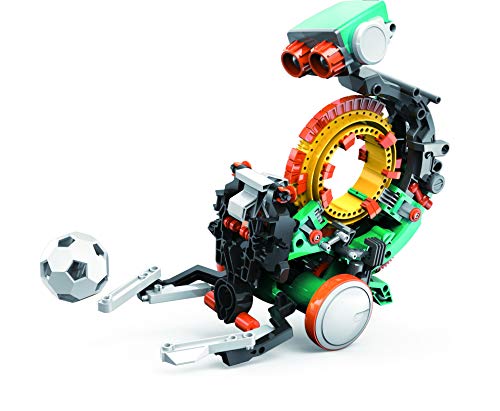
Mech-5 blends mechanical engineering with coding basics through a mission-based design. This entry-level robot can perform actions like throwing, lifting, kicking, and drawing by snapping coding buttons onto a coding wheel. It’s engineered to spark curiosity about engineering principles while offering approachable coding tasks for young learners.
Sphero Bolt+ – Coding Robot Ball

Bolt+ offers a gradient of programming from drag-and-drop blocks to JavaScript and Python, with an animated LCD screen for feedback. Real-time data and sensors drive interactive experiences, animations, and problem-solving tasks. Free standards-aligned lessons and educator guides help integrate Bolt+ into various subjects across classrooms and homes.
Wonder Workshop Dash Robot – Voice-Activated Coding

Dash is a voice-activated programmable robot designed for kids aged 6 and up. It requires no assembly and offers a hands-on way to learn sequencing, loops, algorithms, and variables through five companion apps. The out-of-the-box setup supports classroom and family learning with Blockly-based and exploratory activities that foster computational thinking.
Buying Guide
- Age appropriateness: Choose a robot that aligns with your child’s age and prior exposure to coding. Start with screen-free or simple block-based experiences, then progress to text-based coding as skills grow.
- Learning curve vs. engagement: Some robots emphasize immediate play with basic commands, while others introduce more structured learning paths. Consider whether your child prefers quick wins or long-term projects.
- Programming styles: Look for a mix of drag-and-drop blocks, visual blocks, and text-based coding (JavaScript or Python) to build versatility and future readiness.
- Hardware considerations: Check battery needs, durability, and whether the kit includes sensors like line-following, obstacle detection, or LCD screens for feedback.
- Expandability and ecosystem: Some robots offer additional apps, lessons, and community projects. A broad ecosystem can extend learning over time.
- Screen time balance: Screen-free options can reduce transitions between play modes and support hands-on problem solving. Combine both approaches for variety.
- Educational value: Favor kits with teacher guides, lesson plans, or structured activities to maximize learning outcomes beyond curiosity-driven play.
- Setup and maintenance: Consider ease of assembly (or none), required batteries, and replacement parts availability when evaluating long-term use.
- Safety and durability: Look for sturdy construction and non-toxic materials, especially for younger children who may handle robots roughly.
- Budget and lifespan: Higher upfront cost can reflect richer learning paths, but ensure the selected robot matches your child’s current interests and learning goals.