Best Programmable Robot Kits for Beginners: Easy Path to Coding and Robotics
Discover the top programmable robot kits designed for beginners. These kits combine hands-on building with kid-friendly coding, making it simple to learn Scratch, Arduino, Python, and more. Perfect for classrooms, homeschool, or family projects, they help young learners develop problem-solving, electronics, and critical thinking skills while keeping the experience engaging and fun.
| Product | Brand | Primary Focus | Age Range |
|---|---|---|---|
| Makeblock mBot Robot Kit (Scratch & Arduino) | Makeblock | Intro to robotics and block-based coding | 8-12+ |
| ELEGOO UNO R3 Smart Robot Car Kit V4 | ELEGOO | Arduino robotics and hands-on electronics | 8-16 |
| Makeblock mBot Kit With Scratch Box | Makeblock | Scratch and Arduino learning with guided projects | 8-12 |
| ELEGOO Conqueror Robot Tank Kit | ELEGOO | Arduino-based tank robot with open resources | 8-16 |
| ACEBOTT Smart Robot Car Kit | ACEBOTT | ESP32-based robot with camera and Scratch/Arduino | 8-16 |
Makeblock mBot Robot Kit, Scratch & Arduino

The mBot robot kit is an entry-level educational robot designed to introduce electronics, robotics, and programming in a straightforward way. It supports Scratch and Arduino, helping kids learn coding step by step through interactive software and accompanying resources. Building this kit takes around 15 minutes, after which learners can explore functions such as line-following and obstacle avoidance with a remote-control car mode. Rich tutorials accompany the kit, including coding cards and lessons, paired with three free Makeblock apps and mBlock software to enable remote control, games, and coding adventures. Note that a CR2025 battery for the remote and four AA batteries for the robot are required but not included.
ELEGOO UNO R3 Smart Robot Car Kit V4 for Arduino

The ELEGOO Smart Robot Car is aimed at beginners who want hands-on programming, electronics assembly, and robotics fundamentals. It provides a complete package with 24 types of modules, including obstacle avoidance and line tracing, plus control via Android and iOS devices. The kit uses a simplified interface and standardized ports (XH2.54) to reduce setup errors, making it easier to assemble the car and start experimenting with autonomous behaviors while exploring how sensors, motors, and microcontrollers interact.
Makeblock mBot Kit With Scratch Box

This mBot kit focuses on coding and projects that blend Scratch and Arduino, offering four rewarding learning projects such as line-following and obstacle avoidance, along with remote-control modes. The setup emphasizes a multi-project approach that reinforces problem solving and computational thinking as kids progress. Comprehensive manuals and visual guides help learners construct and program the robot with clarity, supporting a positive, self-paced learning experience.
ELEGOO Conqueror Robot Tank Kit
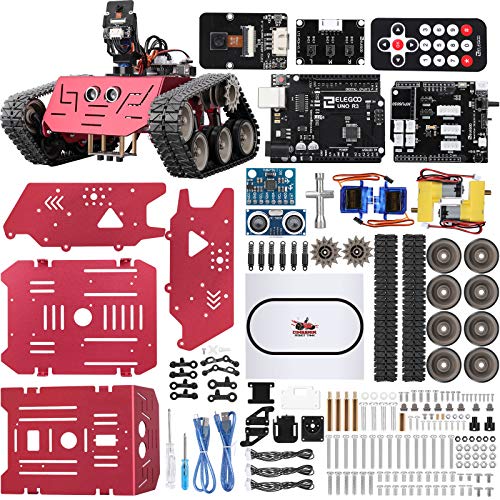
Based on Arduino, this kit offers open resources and rich learning materials for robotics education. It supports DIY assembly that helps cultivate focus and hands-on skills. The kit features graphical programming options and a variety of car functions to stimulate creativity and imagination, making it suitable for beginners who want to explore how software controls hardware and how sensors guide autonomous behavior.
ACEBOTT Smart Robot Car Kit with Camera

ACEBOTT combines an ESP32 controller with compatibility for Arduino and Scratch, offering a 3MP camera for real-time streaming to a smartphone. The kit provides 16 tutorials that guide beginners from basic assembly to coding, with modular expansion options like a robotic arm or solar upgrade. It supports multiple control methods (app, remote, and traditional code) and is designed to grow with a learner’s skills, suitable for long-term STEM engagement and project-based learning.
Buying Guide: Key Considerations For Choosing A Starter Robot Kit
When selecting a beginner-friendly programmable robot kit, consider how it aligns with the learner’s goals, available time, and future skill development. Here are some essential factors to weigh:
- Programming language options: Look for kits that start with block-based coding (like Scratch) and offer text-based options (Arduino, Python) as skills mature.
- Hardware complexity: Beginner kits should balance ease of assembly with room to grow. Modular kits allow adding sensors and components later.
- Learning resources: Tutorials, projects, and example codes accelerate learning. Comprehensive guides are valuable for self-paced study.
- Expansion potential: Kits that support extra modules (e.g., arms, wheels, solar panels) extend the learning curve and keep students engaged.
- Control methods: USB, Bluetooth, and Wi-Fi options influence how students interact with the robot and integrate with devices.
- Community and support: A strong user community and official support can help troubleshoot issues and inspire ideas for new projects.
- Durability and safety: Sturdy chassis and age-appropriate components reduce frustration and encourage experimentation.
- Cost and batteries: Consider what batteries are included or required and the long-term cost of replacements and upgrades.
In choosing among these five kits, consider the learner’s curiosity level and preferred learning style. Some students respond well to guided projects with visual steps, while others thrive on open-ended challenges that invite experimentation. The right kit offers a balance of structured activities and freedom to explore robotics concepts such as sensors, motor control, data processing, and basic AI reasoning.