Best Retro Arcade for Education: Engaging Ways to Learn Coding and More
Retro arcade devices can turn learning into an interactive, hands-on experience. From block-based programming to Python, these devices help students explore concepts like game design, logic, and computational thinking in a tangible way. The following selections emphasize educational value, classroom usability, and age-appropriate features while preserving the nostalgia of classic gaming.
| Product | Key Educational Feature | Age/Use |
|---|---|---|
| ELECFREAKS Retro Coding Arcade | Block programming and Python for STEM learning | Students, classroom |
| ELECFREAKS microbit Retro Makecode Arcade | Makecode arcade, remote control, game creation | Middle school+ |
| Arcade Classics Pac-Man Mini Arcade | Retro gameplay with full-color display for engagement | All ages |
| My Arcade Atari Gamestation Go | 200+ built-in retro titles with licensed games | Middle school–high school |
| Orb Mini Arcade Machine | 300 built-in games with portability | All ages |
ELECFREAKS Retro Coding Arcade
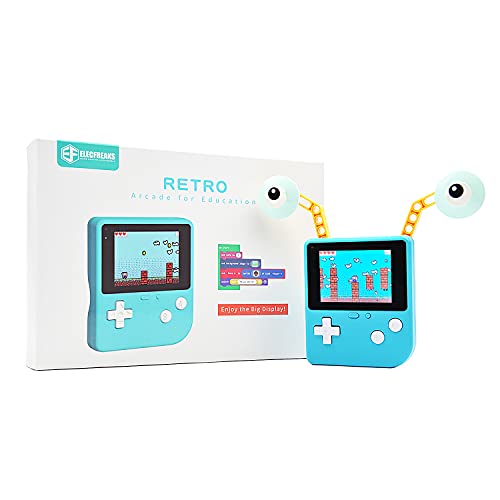
The ELECFREAKS Retro Coding Arcade is designed as a large-screen game programming learning machine suitable for STEM education. It supports block programming via Makecode and Python, enabling learners to create self-defined game roles, multiple scenery and plot designs. Built-in sensors broaden experimentation opportunities and support hands-on exploration of computational thinking.
Educational relevance: The device emphasizes creation over consumption, allowing students to design and program their own games rather than merely playing preloaded titles. It aligns with inquiry-based learning by encouraging experimentation with game mechanics, storytelling, and sensor-driven interactions.
Curriculum fit: Ideal for computer science units focusing on block-based coding, introductory Python, and project-based learning. Its self-contained design makes it suitable for classroom demonstrations or student-led stations.
ELECFREAKS microbit Retro Makecode Arcade

The microbit Retro Makecode Arcade centers on micro:bit integration with a joystick, enabling remote control experiments and game creation. Its translucent acrylic design provides a visually engaging look while the card slot accommodates the micro:bit motherboard for driving projects. The platform supports Makecode programming to customize game characters, scenes, and plots, fostering computational thinking.
Educational relevance: This device is well-suited for making and tinkering activities, helping students bridge hardware with software through graphical programming. It supports hands-on learning in computer science and digital storytelling.
Curriculum fit: Great for middle school coding units, robotics-inspired activities, and introductory programming sequences. It complements lesson plans that emphasize iterative design and prototyping.
Arcade Classics Pac-Man Mini Arcade

Arcade Classics Pac-Man Mini Arcade delivers authentic 1980s arcade gameplay in a compact form. Its retro graphics and vivid colors recreate the original Pac-Man experience, while a joystick-based control scheme preserves the tactile feel of classic gaming. This device is primarily a nostalgic centerpiece but can be used to introduce lessons on game design history and user experience in a classroom setting.
Educational relevance: Useful for discussions on evolution in game design, user interfaces, and how early hardware shaped software development. It can serve as a springboard for projects about game loops, scoring, and level design.
Curriculum fit: Suitable for multimedia history lessons, introductory game design modules, and classroom demonstrations on user interaction and entertainment computing.
My Arcade Atari Gamestation Go
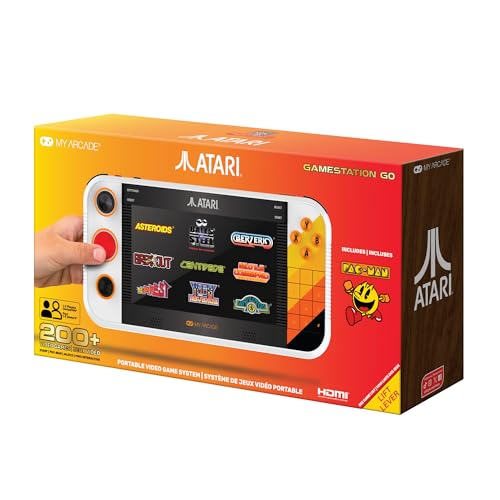
The My Arcade Atari Gamestation Go is a rechargeable handheld with over 200 built-in retro games. Licensed titles from Atari platforms and other publishers extend the catalog, providing a broad range of classic experiences. This device emphasizes portable learning and retention through repeat gameplay and familiar mechanics from Atari’s legacy games.
Educational relevance: While focused on gameplay, it offers opportunities to study game history, platform differences, and the evolution of game design. It also supports discussions about memory, processing limits, and user experience in early consoles.
Curriculum fit: Appropriate for history of computing modules, introductory game analysis tasks, and demonstrations about how hardware constraints shaped software design.
Orb Mini Arcade Machine

The Orb Mini Arcade Machine offers 300 built-in games within a compact, highly portable form factor. It features an 8-bit retro aesthetic, an 8-way joystick, and two action buttons with adjustable volume. Its lightweight design supports classroom portability and individual study sessions, making it a flexible tool for short, focused learning activities.
Educational relevance: Useful for quick, hands-on exploration of game design concepts, retro graphics, and basic problem-solving through classic game mechanics. It can also support after-school coding clubs and cross-curricular activities.
Curriculum fit: Fits well with quick-start coding challenges, quick prototyping of user interfaces, and explorations of 8-bit game design principles. The device’s portability makes it easy to implement in diverse learning environments.
Buying Guide: Key Purchase Considerations And Comparisons
- Educational goals: Choose devices that support coding languages and concepts you want to teach, such as Makecode, Python, or game design fundamentals.
- Programming and curricula alignment: Devices with block-based coding and Python options (like the ELECFREAKS Retro Coding Arcade) align well with STEM curricula and project-based learning.
- Hardware features: Look for devices with color displays, robust joysticks, and sensor integrations for interactive experiments. Consider screen size, controls, and battery life for classroom use.
- Portability vs. classroom display: Handheld models are portable for stations or take-home work, while larger retro consoles can serve as classroom demonstrations or group activities.
- Encouraging creativity: Prioritize devices that emphasize user-created content and game design, rather than strictly preloaded games, to maximize learning outcomes.
- Durability and safety: Classroom devices should be durable, with sturdy casings and non-toxic components suitable for students of varied ages.
- Content variety: A broader catalog of games or activities can support broader discussions about history, design, and computational thinking, but ensure content is age-appropriate.
- Budget considerations: While some devices offer extensive game libraries, others emphasize portability and programming versatility. Balance cost with educational value.