Best Simple Robots for Kids: Top Pick Educational Robots for Play and Learning
Discover a curated list of beginner-friendly robots that spark curiosity, teach basic coding concepts, and provide engaging play for kids ages 3–12. Each option below features intuitive controls, interactive activities, and durable designs suitable for classroom or home use. From gesture-controlled bots to screen-free coding kits, these picks emphasize hands-on learning and safe exploration.
Summary of Selected Products
| Product | Brand | Key Focus |
|---|---|---|
| BAZOLOTA Robot Toys for Kids | BAZOLOTA | Gesture control, programmable actions, singing and dancing |
| Botley the Coding Robot | Learning Resources | Screen-free coding, age 5+, beginner-friendly |
| Ruko 1088 Smart Robot | Ruko | Voice control, app control, 10 songs, expressions |
| Thames & Kosmos Kids First Robot Factory | Thames & Kosmos | Motorized robots, storybook-based build |
| KaeKid Robots | KaeKid | LED eyes, dancing, 2.4 GHz remote |
BAZOLOTA Gesture Robot: Learning And Fun
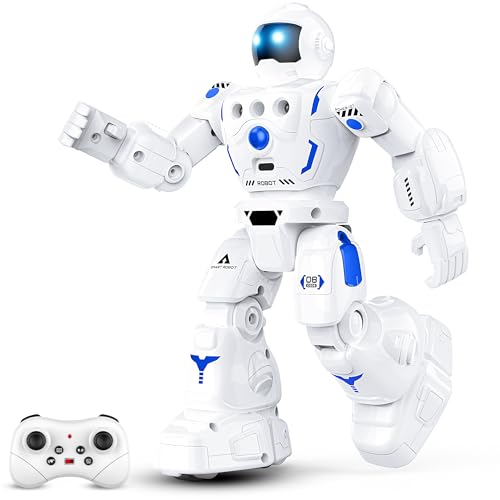
The BAZOLOTA robot toys for kids combine gesture sensing with approachable remote control features. Simple hand gestures guide the robot to slide forward, backward, left, or right, offering up to 164 feet of control range for lively play. Beyond movement, the robot can memorize a sequence of up to 50 actions, enabling kids to program a chain of movements and actions. When in programming mode, young minds can construct multi-step routines—turn, slide, walk, dance, or sing—then watch the robot perform in sequence. This hands-on approach supports logical thinking and early programming concepts in an engaging, age-appropriate package. The singing and dancing performances, along with adjustable volume, help adapt to different environments and hearing needs. Suitable for ages 3–12, this robot provides a bridge between basic motor play and introductory coding.
Key features in action include: gesture control, programmable sequences, remote operation, and entertaining sound. The design emphasizes friendly interaction and exploration rather than intense screen time. While it offers a rich set of activities, the instruction set stays accessible for younger users, with growth potential for older children as they experiment with longer programs and alternate commands. The robot’s versatility makes it a compelling choice for classrooms, birthday gifts, or family playtime centered on STEM learning.
Botley The Coding Robot — Screen-Free Coding

Botley the Coding Robot emphasizes screen-free coding for children aged five and up. It introduces fundamental programming concepts through simple remote-control coding, enabling kids to experiment with loops, conditionals, and sequences without digital devices. The kit is designed to grow with the child, offering 80-step programming options, loops, and obstacle detection that provide increasing challenges as skills mature. Ready to use out of the box, Botley typically requires AA batteries for operation. Its hands-on approach supports critical thinking and problem-solving while keeping screen time low, making it a staple for early STEM education at home or in the classroom.
The robot’s adaptability ensures that new coders stay engaged as their abilities expand. Beyond coding, Botley encourages young learners to plan, test, and refine sequences, promoting logical reasoning and foundational computational thinking. While beginners will appreciate its simplicity, older kids can push the boundaries with longer programs and more intricate challenges. This makes Botley a versatile choice for mixed-age households or classrooms looking for a durable, educational, and portable coding robot.
Ruko 1088 Smart Robot — Interactive Learning

The Ruko 1088 is a large, programmable robot designed to captivate older kids with robust expressive capabilities. Standing about 15.8 inches tall, this robot offers voice control, app-based control, and a variety of interactive functions such as 10 expressions, 10 songs, and multiple movement modes. Its design supports STEM exploration by introducing basic programming concepts through engaging activities like storytelling, dancing, and music. The device fosters creativity and coordination while providing a tangible representation of how robotics and software can work together in real time. This makes it a compelling option for students beginning to explore robotics beyond basic toy functions.
Users can explore multiple play modes including gymnastics, storytelling, and recording, making the Ruko 1088 more than just a toy. Its combination of physical durability and digital control helps bridge hands-on learning with modern technology. While it may be more complex than entry-level models, it remains approachable for curious children and their families seeking a mid-range educational robot with broad appeal.
Thames & Kosmos Kids First Robot Factory
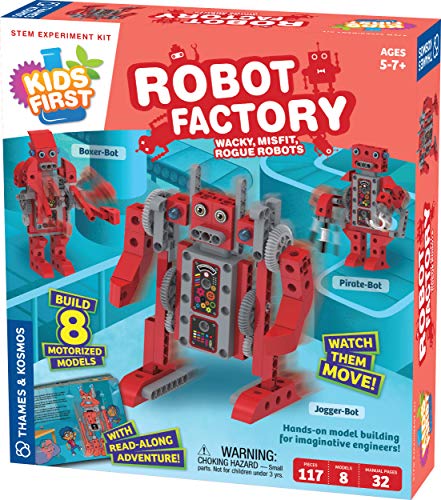
The Thames & Kosmos Kids First Robot Factory introduces young engineers to mechanical construction through hands-on model building. With a storybook-style manual, children follow Ty and Karlie as they help fix wacky robots from a fictional factory. The kit guides budding builders through eight motorized robot models, using a combination of simple tools and clear, step-by-step assembly instructions. The focus here is on early mechanical engineering concepts, problem-solving, and imaginative play, making it ideal for ages five and up. The accompanying narrative adds context and motivation, turning a kit into an interactive learning experience rather than just a collection of parts.
As an introductory STEM activity, the Robot Factory emphasizes real-world design thinking and hands-on experimentation. Children learn to sequence tasks, understand gears and motion, and appreciate how different components contribute to a functioning machine. While beginner-friendly, the kit can challenge older children who want to build more complex models or decorate their robots with personalized touches. It’s a solid choice for families seeking a tactile, story-led path into robotics.
KaeKid Robots: LED Eyes And Dancing

KaeKid robots offer a compact, friendly design with 2.4 GHz remote control, LED eyes, and flexible arms suitable for kids ages 3–8. The robot supports dancing, sounds, and straightforward forward/backward and left/right movements, making it a practical entry point for those new to remote-controlled play. The 32-foot control range in an obstacle-free environment provides responsive control within a typical play area. The device is built with safe, durable materials appropriate for younger children, and the design emphasizes simple operation for early RC experience. Batteries are required for both the robot and the remote but are not included, which is common for many toy robots.
While designed for younger children, KaeKid offers enough interactivity to keep a child engaged as they learn basic motion control and timing. The LED eyes and dancing features add a playful element that appeals to kids who enjoy personality-driven toys. For families seeking a small, easy-to-use robot that encourages movement and creativity, KaeKid is a compelling option within the early RC robot category.
Buying Guide: Key Purchase Considerations
- Age appropriateness: Choose robots explicitly designed for the child’s age to ensure safe handling, appropriate complexity, and engaging activities.
- Control style: Gesture control, remote control, and app-based control offer different learning pathways. For younger kids, gesture and simple remote controls often work best; older children may enjoy app-enabled features and programming options.
- Programming and learning scope: Screen-free coding kits like Botley introduce foundational concepts, while programmable robots with sequences or obstacle-avoidance provide deeper STEM challenges.
- Durability and materials: Look for sturdy plastics and safe construction, especially for younger players who may drop or mishandle toys.
- Expansion potential: Some kits grow with the child, offering more advanced programming or additional models to build, which can extend the toy’s lifespan and learning value.
- Safety features: Consider volume control, non-toxic materials, and age-appropriate warnings to protect hearing and safety during play.
- Battery needs: Note battery types and the included vs. required batteries. Some products require AA or AAA batteries or have rechargeable options.
- Educational value vs. pure play: Evaluate whether the robot emphasizes storytelling, problem-solving, or creative expression to align with learning goals.
When selecting a robot, balance engagement with educational potential. For mixed-age households or classrooms, selecting two or more models with varying levels of complexity can maximize inclusivity and sustained interest. Consider pairing a screen-free option with a programmable model to create a progression that grows with the child’s developing skills. Finally, verify that the product’s packaging and instructions clearly outline safety guidelines and age suitability to ensure a positive and safe learning experience.