Best Drawing Boards for Laptop Use: Top Picks for Sketching on the Go
The search for a reliable drawing board that pairs well with a laptop setup often focuses on portability, stability, and surface quality. This guide highlights five robust options that suit students, professionals, and hobbyists who sketch, draft, or trace while using a laptop. From traditional clip boards to digital drawing pads, these picks balance convenience with performance to support creative work in classrooms, studios, and remote work setups.
Summary of Selected Products
| Product | Brand | Approx. Size | Key Feature |
|---|---|---|---|
| 13×17 Sketch Board | Falling in Art | 13×17 in | Sturdy clip, rubber bands, portable |
| 18×18 Sketch Board | Falling in Art | 18×18 in | Large surface, secure fastening |
| UGEE M708 Tablet | UGEE | 10×6 in active area | 8192 levels pen, USB-C connection |
| 5-Position Wood Drafting Table Easel | Falling in Art | 16.5×12.1 in | Wooden drafting surface, adjustable |
| Optical Image Drawing Board | HAPSAON | 8×5 in projection area | Projection for tracing and painting |
Falling In Art 13×17 Sketch Board

This 13×17-inch sketch board provides a sturdy clip and two elastic rubber bands to secure artwork. The smooth surface acts as a reliable workbench for sketching, with a lightweight profile and a comfortable handle for portability, making it suitable for use with a laptop on the go. The thick hardboard construction and rounded edges reduce the risk of snagging while repositioning sheets during a session.
Falling In Art 18×18 Sketch Board

The 18×18-inch Fallings In Art sketch board expands the workspace while maintaining a secure metal clip and elastic bands for flat, steady drawing. Its portable design, including a comfortable cutout handle, makes it easy to transport between classrooms or studio areas. Like the 13×17 board, the 18×18 version uses a thick, durable hardboard with rounded edges to minimize accidental scrapes during frequent adjustments.
UGEE Graphics Drawing Tablet M708

The UGEE M708 provides a generous 10×6 inch active drawing area with a paper-like texture, designed for digital art, sketching, and photo editing. It features a battery-free pen with 8192 pressure levels, enabling precise stroke control for line weight and opacity. This tablet is compatible with Windows, Mac, Chrome OS, and Linux, and supports major software like Photoshop and Illustrator for versatile workflow integration.
Falling In Art 5-Position Wood Drafting Table Easel
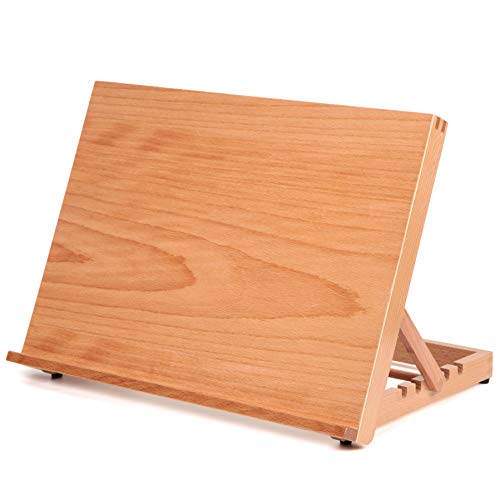
This wood drafting table easel delivers a sturdy, stable surface made from European beech wood. Weighing just 1.9 pounds, it offers mobility for on-the-go sketching, with a smooth 16 1/2 by 12 1/8 inch board that accommodates standard papers and canvases. Its lightweight design, combined with non-slip rubber feet, helps ensure reliable performance in varied environments while maintaining a compact footprint.
HXILAJM 13×17 Inch Drawing Board With Handle
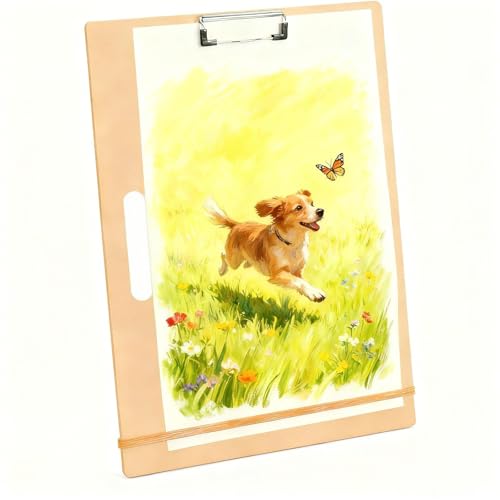
HXILAJM offers a 13×17-inch drawing board with an ergonomic handle for easy transport. The upgraded adjustable metal clips and thickened elastic bands secure sheets and prevent curling, making it a reliable surface for drafting, drawing, and design work in classrooms or field environments. The 5mm density board provides a smooth, flat surface with rounded edges for user comfort during longer sessions.
Buying Guide: How To Choose The Right Drawing Board For Laptop Use
- <strongSurface Size vs. Portability: Larger boards offer more working space but are heavier. If you plan to move between locations or travel with your laptop, a compact 13×17 or 16×12 inch board with a carrying handle is often ideal.
- <strongSecure Fastening: Look for metal clips and elastic bands to hold sheets flat. This reduces paper shifting when you adjust position or use a laptop nearby.
- <strongMaterial And Build: Thick hardboard or wood options provide durability and a stable writing surface. Rounded edges improve safety during frequent handling.
- <strongDigital Compatibility: For digital artists, tablets like the UGEE M708 offer a responsive drawing surface with pressure sensitivity, compatible with common creative software and multiple operating systems.
- <strongErgonomics And Comfort: Handles and lightweight construction enhance portability. A comfortable grip reduces fatigue during longer sessions, whether you’re sketching outdoors or indoors.
- <strongBudget and Use Case: Traditional clip boards suit quick notes and simple sketches; digital tablets suit elaborate artwork with software tools. Consider whether you primarily sketch by hand or integrate with computer workflows.
- <strongDurability And Maintenance: Durable surfaces resist wear and keep drawings clean. Smooth surfaces are easier to wipe down, especially when working with messy media.
- <strongCompatibility With Accessories: Some boards pair with stands, easels, or projection tools. Assess if your setup needs to accommodate a projector, light box, or a laptop stand nearby.
Across these options, users can prioritize a balance of size, stability, and adaptability. For students and professionals who combine laptop usage with on-paper drafting, selecting a board with a secure clamp system and portable design is essential. Digital artists may favor a tablet with high pressure sensitivity and broad OS compatibility to extend their existing computer-based workflows. The right choice depends on whether the primary goal is portability, surface area, or digital integration within a single working environment.