Best 3D Printing for Kids: Safe, Fun STEM Projects at Home
Exploring 3D printing with children can boost creativity, spatial reasoning, and problem-solving. This guide highlights kid-friendly 3D printing tools that balance safety, ease of use, and hands-on learning. From beginner pens to compact desktop printers, the options below emphasize beginner accessibility, durable materials, and engaging design challenges. Each product is evaluated for classroom-friendly use, family downtime, and independent learning potential. The selections focus on safety features, intuitive controls, and printable content that ties into science, technology, engineering, and math (STEM) concepts.
| Product | Brand | Key Feature |
|---|---|---|
| 3Doodler Start+ Essentials 3D Pen Set | 3Doodler | Child-safe design with no hot parts |
| Tina2 Basic 3D Printer | Entina | Fully assembled, auto leveling, compact |
| SCRIB3D P1 3D Pen With Display | SCRIB3D | Display screen, starter PLA, stencil guide |
| Sunlu Mini 3D Printer For Kids | SUNLU | Touch screen, Wi-Fi, enclosed safety |
| Tina2S V12 3D Printer | Entina | Auto leveling, WiFi cloud printing |
Whether you’re seeking a screen-free activity for rainy days or a small classroom setup, these products offer varied ways to dive into 3D creation. The pen-based options emphasize rapid, tactile projects, while the compact printers enable longer-term builds and iterative design. The following sections provide concise product profiles, supported by features designed for youngsters and beginners. Each entry stays within a practical word limit to help readers compare quickly and make informed decisions.
3Doodler Start+ Pen Set
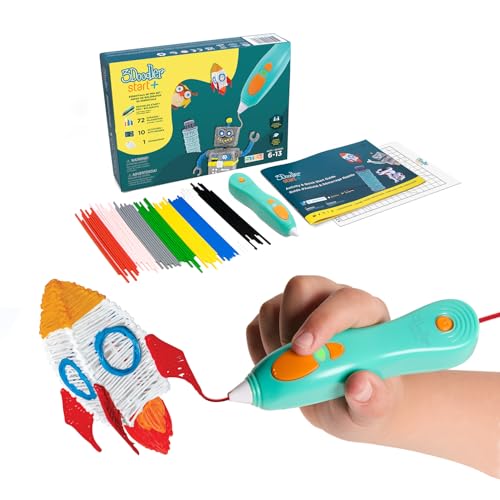
The 3Doodler Start+ is designed as a child-safe 3D printing pen, ideal for kids aged 6+. It features no hot parts, reducing burn risk while allowing tactile drawing with ready-to-use Start plastic filaments. The upgraded model offers more plastics and stencils for expanded creativity, plus a faster charge and a safety stand-by mode. This pen supports screen-free play, helping children connect everyday STEM concepts through hands-on creation, making it a strong introductory tool for at-home learning and early engineering exploration.
Tina2 Basic 3D Printer

The Tina2 Basic is a fully assembled mini 3D printer designed for beginners and kids. It arrives ready to print with a model on a TF card, helping learners start quickly. Its compact design (approximately 8.3″ x 8.3″ x 11.4″) fits desks and classrooms, while a 2.4″ LCD screen and compatible slicer software enable offline printing. The printer supports resume printing after power interruptions, supporting ongoing projects and teaching the value of reliability in manufacturing processes.
SCRIB3D P1 3D Pen With Display

The SCRIB3D P1 is a versatile 3D pen with a built-in display, making it easy to monitor temperature and progress. The kit includes three colors of PLA filament, a stencil book, and a project guide, facilitating beginner-friendly projects and guided practice. Its stepless speed control supports precise design work, from simple shapes to more intricate structures, encouraging children to translate 2D ideas into 3D forms and enhance spatial thinking.
Sunlu Mini 3D Printer For Kids
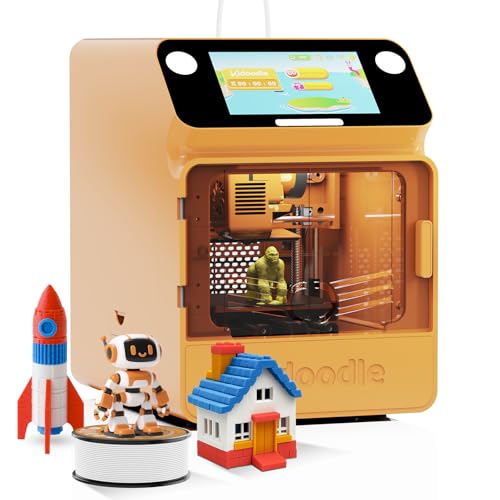
The Sunlu mini 3D printer emphasizes safety with a fully enclosed structure and a door-pause feature that reduces nozzle temperature if opened. It’s designed for kids and beginners with one-click printing, Wi-Fi connectivity, and a library of compatible models. This option suits families seeking a compact, safe device that can integrate with a growing catalog of kid-friendly prints and project ideas, while supporting remote monitoring via its app ecosystem.
Tina2S V12 3D Printer

The Tina2S V12 offers WiFi cloud printing and automatic leveling for a smoother startup experience. It comes ready to use, with a compact build that fits at home or in a classroom. The inclusion of a built-in app and model library supports one-step printing and easy model selection, making it a practical option for students who want to advance beyond basic projects and explore more complex designs.
MYNT3D Super 3D Pen

The MYNT3D Super 3D Pen blends ease of use with advanced control. It features a stepless speed slider for precise material flow and a nearly clog-proof, ultrasonic-sealed nozzle for durability. This pen supports ABS and PLA, enabling a range of project types from simple models to more complex assemblies. It’s well-suited for older kids who want greater control over speed and flow as they experiment with creative engineering ideas.
AOSEED 3D Printer Kit For Kids

The AOSEED 3D Printer Kit is designed as a beginner-friendly system with a large PLA filament set, Wi-Fi and app control, and a sizeable digital model library. It emphasizes one-click printing and voice command accessibility, making it accessible to kids who prefer guided, hands-on learning. With a broad design library and multiple mini design modules, it supports ongoing creative exploration and consistent practice in 3D design and printing.
Buying Guide: Key Purchase Considerations
- Safety and age appropriateness: Look for enclosed printers and pens with fail-safes, non-heated or low-heat components, and parental control features.
- Learning goals: Decide whether you want rapid, tactile drawing (pens) or longer-term projects (printers). Pens support fine motor skills and spatial reasoning; printers enable iterative design and sharing finished models.
- Ease of use: Choose devices with pre-assembled setups, simple interfaces, and beginner-friendly software or app ecosystems to minimize frustration.
- Content and library access: A robust model library or stencil set can keep kids engaged while reinforcing STEM concepts through guided activities and open-ended exploration.
- Safety features in operation: Enclosed housings, automatic shutoffs, and filament handling controls reduce risk during use by younger children.
- Print quality vs. speed: Beginners may prefer reliable, steady performance over extremely high precision. Smaller build volumes are typically sufficient for introductory projects.
- Software compatibility: Ensure slicer software and model libraries support user-friendly workflows and are compatible with your computer or mobile devices.
- Future scalability: If a child grows more proficient, consider devices that can handle more complex designs or offer upgrade paths like additional filaments or modules.
- Support and safety documentation: Access to clear manuals, troubleshooting guides, and customer support can reduce downtime and encourage continuous learning.
- Budget and space: Compact, enclosed units fit desks and shelves, while larger printers may require more space but offer broader capabilities.
In sum, the best choice depends on the child’s age, interest level, and the learning environment. Pen-based kits invite quick, creative play and early engineering thinking, while compact printers provide a pathway to longer-term projects, prototyping, and shared classroom activities. By balancing safety, content availability, and scalability, families can select a kit or printer that grows with their child’s STEM curiosity.