Best Programmable Robots for Teens: Top Coding Bots for Learning
Finding a programmable robot suited for teens can boost STEM skills through hands-on coding, robotics, and problem-solving. This guide highlights five standout options that balance approachable learning with real programming opportunities. Each entry includes key features, so you can compare how they support project-based learning, advanced control, and long-term growth in teen-friendly ways.
Summary of selected products
| Product | Brand | Why it’s a fit for teens |
|---|---|---|
| AceBott 5DOF Robotic Arm Kit | ACEBOTT | Hands-on robotics with ESP32, programmable arm, and expanding project potential. |
| OSOYOO V2.1 Smart IoT Robot Car Kit | OSOYOO | IoT integration, Arduino ecosystem, multi-mode control, broad learning scope. |
| Ruko 1088 Smart Robot | Ruko | Large, expressive robot with multiple control modes and creative programming. |
| Ruko 6088 Gesture Robot | Ruko | Gesture sensing plus APP control and remote options for diverse play & learning. |
| Henoda STEM Building Robot Kit | Henoda | Extensive parts kit with remote and app control for long-term engineering projects. |
ACEBOTT 5DOF Robotic Arm Kit with ESP32

ACEBOTT’s Robotics for Kids entry centers on building a programmable 5DOF robotic arm powered by an ESP32 controller. The kit includes 16 guided tutorials and HD assembly videos, providing hands-on experience with coding robot control, real-world robotics, and problem-solving. It’s positioned for teens exploring more complex engineering concepts, with expandability through modular add-ons as skills grow. Batteries are required but not included.
OSOYOO V2.1 Smart IoT Robot Car Kit

OSOYOO’s kit emphasizes IoT-enabled learning with WiFi, Bluetooth, and IR remote control. The bundle includes a complete Arduino-friendly setup, several modules (line tracking, ultrasonic, etc.), and a robust STEM platform designed for homeschool use or science fairs. It’s well-suited for teens who want to connect software programming with hardware sensing and remote-capable control.
Ruko 1088 Smart Robot for Kids

The Ruko 1088 stands out with a large, interactive design and multiple control options, including voice and app control. It blends playful features with programming opportunities to develop logic, creativity, and coordination. Its dynamic movement and expressions help teens engage deeply while learning core STEM skills.
Ruko 6088 Gesture Robot

The 6088 offers four control methods—remote, app, gravity-sensing, and infrared gesture sensing—with a 200-icon app-ready program library and a 50-function remote button for custom commands. It emphasizes creative programming, music, and interactive projects, making it a solid choice for teens exploring diverse programming styles.
Henoda STEM Building Robot Kit
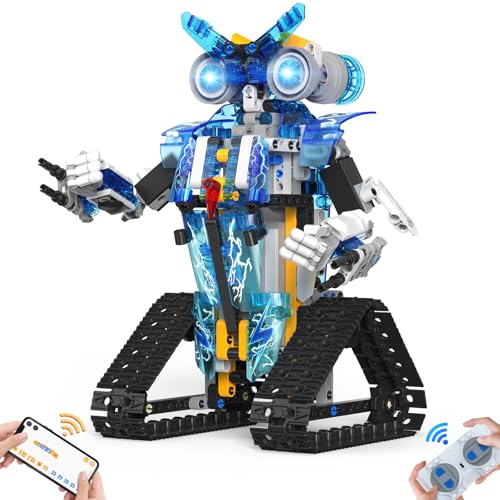
Henoda’s kit emphasizes hands-on building with 443+ pieces, enabling teens to construct elaborate robotic systems. It includes remote and app control, with transparent parts and vivid stickers to foster creativity and problem-solving. Suitable for extended STEM projects, it helps teens develop programming, mechanical understanding, and hands-on design skills.
Buying Guide: Key Considerations for Teens and Parents
- Curriculum alignment: Look for kits that offer structured tutorials, coding challenges, and project-based learning aligned with teen interests in robotics, electronics, and programming languages (e.g., Scratch, Arduino, ESP32).
- Control modalities: A mix of remote, app, voice, and gravity-sensor controls can keep learning engaging and accommodate different learning styles.
- Expandability: Choose systems that support add-ons, new sensors, or advanced programming to grow with the student’s skill level.
- Hardware and software compatibility: Ensure compatibility with common ecosystems (Arduino IDE, Python, Scratch) and standard hardware interfaces for long-term use.
- Hands-on complexity: Start with simpler, guided projects and progress to more complex tasks (object manipulation, autonomous navigation, IoT integration).
- Safety and durability: Look for robust construction, child-safe materials, and clear safety guidelines, especially for larger or more interactive models.
- Community and support: A strong user community, tutorials, and official support help sustain motivation and troubleshoot issues.
- Time and space considerations: Some kits require more workspace and longer build times—plan for after-school sessions or weekend projects.
- Budget and value: Consider total cost, included components, available expansions, and the learning outcomes versus price to determine overall value.